
MFA (Multi-Factor Authentication) — stop 99% of attacks on corporate accounts
Deploying multi-factor authentication (MFA) is today one of the cheapest and most effective defensive mechanisms available to any organization. According to long-term data from Microsoft and CISA, properly implemented MFA blocks the vast majority of automated password attacks — from credential stuffing and password spraying to account takeovers following a password database breach. For a business, this means fewer incidents, shorter downtime, and lower costs for handling GDPR breaches and reporting to supervisory authorities.
Virtline designs and deploys MFA for organizations in the financial sector, manufacturing, energy, healthcare, and public administration. We cover both standard domain and Microsoft 365 users as well as privileged administrator accounts, service access, and login to VPN and web applications. We work with Microsoft Entra ID, WatchGuard AuthPoint, Cisco Duo, Okta, and FIDO2 hardware tokens (YubiKey, Feitian). We integrate MFA with Active Directory, Azure AD, Office 365, SAML/OIDC, RADIUS, VPN concentrators, and SaaS portals — selecting the method (push, TOTP, hardware key, certificate, biometrics) to the user’s role and risk profile.
The result is a consistent login policy compliant with NIS2 Article 21, ISO/IEC 27001 A.5.17/A.8.5, and DORA Article 9 — without excessive friction for employees.
What does MFA implementation with Virtline include?
We work in a framework covering all access layers — from domain accounts to critical business applications. The implementation scope includes:
Account and login path inventory — review of user, administrator, service, and external vendor accounts, plus a map of all login points (AD, M365, VPN, SaaS applications).
Technology and method selection — choice of vendor (Microsoft Entra ID, WatchGuard AuthPoint, Cisco Duo, Okta) and methods (push, TOTP, FIDO2, certificate, biometrics) appropriate to role and risk.
Conditional access policy — rules triggering MFA based on login risk, location, network, device, and application type.
System integration — Active Directory, Azure AD, Office 365, SAML/OIDC for web applications, RADIUS for VPN and Wi-Fi, RDP/RD Gateway agents.
Onboarding and self-service — authentication method registration, self-service portals, emergency procedure for lost devices and tokens.
Monitoring and reporting — alerts for unusual login attempts, reports for NIS2, ISO 27001, and DORA audits, SIEM integration.
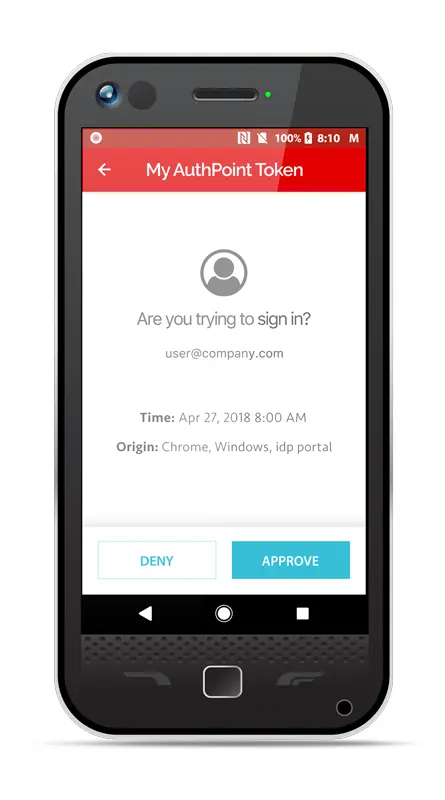
Benefits of MFA implementation
Blocks the majority of password attacks — credential stuffing, password spraying, and account takeovers after a database breach stopped at the second factor.
NIS2, ISO 27001, and DORA compliance — documented MFA for privileged accounts and remote access, ready reports for audits.
Remote access protection — secure login to VPN, RDP, M365, and cloud applications from any location.
Reduced GDPR incident risk — unauthorized access to personal data made significantly harder, lowering the risk of a breach notification to supervisory authorities.
Lower cyber insurance premiums — insurers increasingly condition policy terms on the presence of MFA for key accounts.
Fewer password resets — push and hardware keys reduce the number of helpdesk tickets related to lost access and password recovery.
Better visibility of attack attempts — SIEM alerts about unusual login attempts help detect phishing campaigns targeting employees early.
How we implement MFA — 4 stages
We plan implementation iteratively, starting with the most exposed accounts (administrators, remote access) and ending with full organizational coverage. Each stage ends with a concrete deliverable — from a risk map to a monitoring report.
1. Analysis and design — account inventory, login paths, and critical applications; mapping NIS2/ISO 27001/DORA requirements; selection of technology and authentication methods; design of conditional access policies and implementation schedule.
2. Pilot for critical accounts — MFA launch for administrators, remote access (VPN, RDP), and Microsoft 365; preparation of emergency procedures; resilience testing and initial rule tuning.
3. Organization-wide rollout — phased deployment for remaining user groups; communication campaign; onboarding sessions and self-service materials; ongoing issue monitoring.
4. Stabilization and monitoring — conditional access policy tuning based on operational data; SIEM event integration; quarterly compliance reports and privileged role reviews.
MFA integrations and methods we support
We match the authentication method to the role and risk level. Administrative accounts, bank tellers, or SCADA system access get the strongest FIDO2 keys; office users rely on mobile apps with push notifications and biometrics; guests use one-time SMS or email codes as the lowest-tier option.
- Active Directory / Azure AD / Entra ID — native Microsoft MFA, conditional access policies, Conditional Access App Control
- Microsoft 365 and SaaS applications — SAML 2.0 and OpenID Connect (OIDC) for Salesforce, Atlassian, Google Workspace, Dropbox Business, and others
- VPN and remote access concentrators — WatchGuard Firebox, Cisco AnyConnect/Duo, Fortinet FortiGate, Palo Alto GlobalProtect via RADIUS or SAML
- Corporate Wi-Fi and NAC — EAP-TLS with certificates or PEAP with an additional MFA factor for privileged connections
- RDP, RD Gateway, and Linux servers — MFA agent for Remote Desktop, PAM console integration
- Legacy applications — pre-authentication via reverse proxy (Microsoft Application Proxy, WatchGuard AuthPoint Gateway) where the application does not natively support SAML/OIDC
MFA and NIS2, ISO 27001, DORA — requirement mapping
Multi-factor authentication is directly required by current security and supervisory regulations. The most important references cited by auditors:
- NIS2 Directive (Article 21) — cybersecurity risk management measures require access control policies, multi-factor authentication, and secured remote access connections. MFA is one of the elementary technical measures for essential and important entities.
- ISO/IEC 27001:2022 — Annex A — control A.5.17 Authentication information, A.8.5 Secure authentication (including multi-factor), A.8.2 Privileged access rights, and A.8.18 Use of privileged utility programs.
- DORA Regulation (Article 9) — protection and prevention mechanisms require strong authentication and restriction of access to ICT systems based on the principle of least privilege.
- EBA guidelines and PSD2 — strong customer authentication (SCA) for access to critical systems in the financial sector, including electronic banking and payment accounts.
Frequently asked questions about MFA
How much does MFA implementation cost for a mid-sized company?
Cost depends on the chosen technology, number of users, and scope of integrations. Organizations already using Microsoft 365 Business Premium or E3/E5 plans often have the licence cost included, and deployment reduces to designing conditional access policies, application integration, and an onboarding campaign. For organizations outside the Microsoft ecosystem, we work with WatchGuard AuthPoint, Cisco Duo, or Okta — licences typically start from a few euros per user per month, with FIDO2 hardware tokens added for critical accounts. We prepare a specific quote after an environment inventory.
How long does MFA deployment take?
For a small or medium organization, a typical project closes in 4–8 weeks: one week for inventory and design, 1–2 weeks for piloting critical accounts, 2–4 weeks for phased rollout, and one week for stabilization. Large environments with dozens of legacy or OT/SCADA applications typically require 3–6 months due to pre-authentication integrations and the need to prepare emergency procedures for each user group.
Will MFA slow down our employees?
Well-designed conditional access policies do not require a second factor confirmation at every login. A push notification with a fingerprint takes 2–3 seconds, and a FIDO2 key requires a single gesture. We minimize friction by remembering trusted devices, bypassing MFA on the internal network for low-risk applications, and tuning rules based on operational data.
What systems does MFA integrate with?
We standardly integrate MFA with Active Directory, Azure AD/Entra ID, Microsoft 365, VPN concentrators (WatchGuard, Cisco, Fortinet, Palo Alto), RADIUS servers for Wi-Fi, RDP/RD Gateway terminal servers, and SAML/OIDC applications. For legacy applications without SAML/OIDC support, we use reverse proxy with pre-authentication (Microsoft Application Proxy, WatchGuard AuthPoint Gateway).
How often should MFA policies and methods be reviewed?
We review conditional access policies with the client quarterly — alongside organizational changes, critical application list updates, and incident findings. Strong authentication methods (FIDO2, TOTP tokens) are updated in line with device lifecycle and vendor vulnerability notices. A full NIS2/ISO 27001/DORA compliance review is performed annually and immediately following any security incident.
How can we verify that MFA is actually working?
We measure MFA effectiveness using three types of tests. First, identity provider reports showing the number of blocked login attempts, incorrect passwords, and rejected MFA attempts. Second, controlled red-team tests simulating phishing for one-time codes and MFA fatigue attacks (push spam). Third, a quarterly compliance audit verifying coverage of all critical accounts and login paths. Results are included in reports for management and ISO 27001 and NIS2 auditors.
Why choose Virtline for MFA implementation
Virtline is a team of security engineers with extensive experience in identity and access management deployments in organizations across Poland and the broader European market. We do not sell a single product — we match the solution to the scale, regulations, and working culture of your organization. Clients value that we start with an inventory and risk map rather than a shopping list, and that we remain available for operational support after deployment.
Key benefits of MFA implementation with Virtline:
Experience deploying Microsoft Entra ID, WatchGuard AuthPoint, Cisco Duo, and Okta
TÜV NORD security certificate — ISO/IEC 27001:2023
Engineers certified by Microsoft, Cisco, and WatchGuard
Deployments covering VPN, RDP, Wi-Fi, and legacy applications
Mapping implementation to NIS2 Art. 21, ISO 27001 A.5.17/A.8.5, and DORA Art. 9
Emergency procedures and self-service for lost tokens and devices
SIEM login event integration and quarterly compliance reports
Post-deployment operational support in the IT outsourcing model
Contact us to discuss MFA implementation tailored to your organization’s scale, critical application list, and NIS2, ISO 27001, and DORA requirements.
Stop the majority of attacks on corporate accounts — deploy MFA that genuinely protects without disrupting work.
ISO/IEC 27001:2023 Certification
Virtline certified by TÜV NORD
Virtline holds the PN-EN ISO/IEC 27001:2023-08 certificate issued by TÜV NORD. Certificate number: AC090 121/2469/6137/2026, valid until 02.2029.
Talk to a Virtline expert
We will scope your project, propose an architecture and prepare a fixed quote within 5 working days. No obligations, no junior reps — you talk to engineers from day one.